
How to generate AI image variations you can actually compare
An AI image variation is useful only when you know what changed.
If you rewrite the prompt, switch the style, change the palette, add a reference, and move to a different model at the same time, you may get more images, but you will not learn much from them. A better workflow holds most variables steady, changes one direction at a time, and puts every candidate in the same view.
BYOBanana uses Google's Nano Banana image models through your own API key, creates several candidates from one brief, and puts them in one contact sheet so you can pick a winner.
Open BYOBanana and generate Nano Banana image variations
What counts as an AI image variation?
Prompt-first variations
Start with one text brief and generate several independent candidates. The subject and controls stay the same, while the model varies details such as composition, shape, lighting, and visual emphasis.
Use prompt-first variations when you have an idea but no source image yet.
Reference-first variations
Start with one or more reference images and a written instruction. The references can help anchor the subject or direction while the model creates new candidates.
Use reference-first variations when showing is easier than describing.
Many tools use AI image variation to mean only the second task. BYOBanana
supports both: a prompt can stand alone, or you can add reference images to the same batch
workflow.
Four variables worth testing
| Variable | Hold steady | Change | What you learn |
|---|---|---|---|
| Composition | Subject, recipe, palette | Variant seed or independent call | Which layout reads best |
| Art style | Subject, palette, settings | Recipe | Which visual language fits the idea |
| Color direction | Subject, recipe, settings | Palette | Which color system supports the subject |
| Reference influence | Subject, recipe, palette | Reference set | Whether visual anchors improve the result |
Do not test all four at once. Start with the decision that matters most.
A repeatable image-variation workflow
1. Write a brief that describes the decision
Name the subject, intended use, and important constraints. Avoid filling the brief with decorative adjectives before you know which direction you need.
Weak:
Make something amazing and futuristic.
Stronger:
A compact project icon for a developer tool that compares database migrations. One dominant object, legible at small size, no text.
The stronger brief gives every candidate the same job.
2. Choose one comparison axis
For a first run, choose either:
- One recipe with four composition variants
- Three recipes with two variants each
- One recipe tested against two palettes
- One recipe with and without a reference image
Four variants is a practical starting point for composition. Two variants per recipe can be enough for an initial style comparison. These are workflow suggestions, not guarantees of a good result.
3. Keep model settings fixed
Use the same model, image size, aspect ratio, search setting, and subject brief across the comparison. If you change a setting, record it.
A model change can affect how well the model follows your brief, plus visual quality, speed, and price. An unlabeled mixed-model contact sheet is not a clean comparison.
4. Lock the palette when comparing styles
A fixed palette makes visual differences easier to attribute to the art style rather than color mood. BYOBanana offers seven predefined palettes, each represented by exact hex colors in the rendered prompt.
If palette fidelity is the experiment, do the reverse: keep the style recipe fixed and change only the palette.
See every BYOBanana art style recipe and palette
5. Check the cost before generating
Every candidate is an API request billed through the Google project attached to your key. A run with three recipes and four variants requests twelve candidates.
BYOBanana shows an estimate before generation. Treat it as an estimate, and verify current model pricing in Google's documentation.
6. Compare in one contact sheet
Scan the whole batch before opening a single candidate. Look for:
- Silhouette and composition
- Subject accuracy
- Palette adherence
- Style adherence
- Legibility at the intended size
- Unwanted text or artifacts
- Whether the result still works when cropped
Then inspect the strongest candidates at full size.
7. Export the keepers, not the whole experiment
Select the candidates that remain useful after inspection. BYOBanana downloads them in one ZIP, along with a plain text manifest of how each image was made: model settings, rendered prompts, recipes, palette, and file hashes.
The manifest documents the run. It is not proof of authorship, originality, or legal clearance.
Worked comparison
One real run sent the ‘SUMMER MIX’ cassette through two recipes with two variants each. The result is four candidates in one contact sheet.
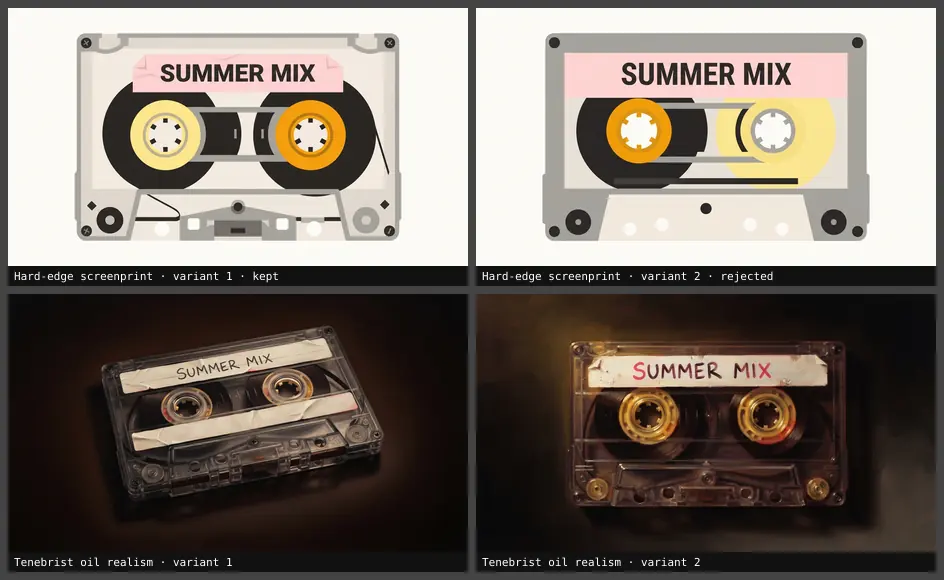
Three things stand out:
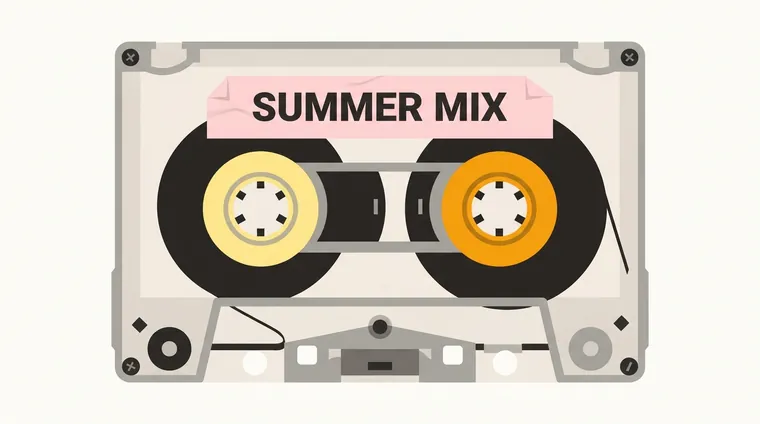
- Which candidate won and why. Hard-edge screenprint, variant 1: both reels read as solid discs, the Sunlit coral banner and amber hubs carry the palette, and the whole cassette stays legible shrunk to a tile.
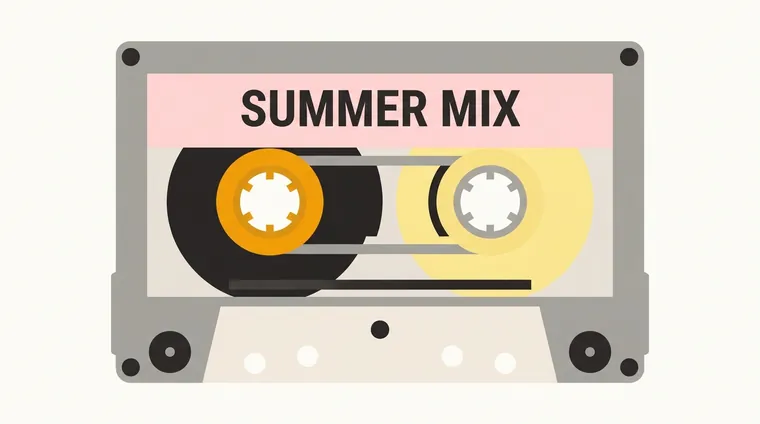
- Which candidate failed and why. Hard-edge screenprint, variant 2: the two reels overlap and the right reel renders as a ghosted, half-transparent disc, so the tape mechanism reads as unfinished. Same recipe, same prompt, one unlucky composition.
- What to hold steady or change next. Keep the subject, recipe, and Sunlit coral palette fixed. The oil-realism pair is handsome but reads as mood rather than a clean playlist tile, so the next run would drop it and generate two more screenprint variants to choose a composition.
We publish the misses too. That is what a real run looks like.
How consistent will the variations be?
Consistent art direction and consistent subject identity are different problems.
A recipe and palette can repeat prompt constraints across a batch. That does not guarantee identical characters, products, geometry, or layout. Current Nano Banana models accept image inputs, so references can help. Generation is still probabilistic.
If exact identity matters:
- Use clear, relevant reference images.
- Avoid changing several attributes at once.
- Keep the model and settings fixed.
- Inspect details rather than trusting the thumbnail.
- Expect to reject candidates.
Do not promise character or product consistency based only on a shared style recipe.
When to generate more variants
Generate another batch when the direction is correct but execution varies. Rewrite the brief when every candidate fails for the same reason.
Examples:
- Correct style, weak compositions: keep the recipe and palette, generate more variants.
- Wrong focal object in every image: clarify the subject brief.
- Palette ignored across the batch: simplify competing color instructions.
- Good square image, poor circular crop: switch to a circle-safe project-icon recipe.
More candidates cannot repair a contradictory brief.
Frequently asked questions
Can AI generate variations of an existing image?
Yes. Add the image as a reference and describe what should remain stable or change. The model creates a new image rather than a guaranteed pixel-level edit, so inspect identity and detail carefully.
Can I create several variations from one prompt?
Yes. BYOBanana can request one to eight variants per selected recipe. Each candidate uses the same rendered prompt for its recipe but comes from an independent generation call.
Is changing the art style the same as creating a variation?
It is one kind of variation. A composition variation keeps the style fixed, while a style variation deliberately changes the visual treatment. Label the comparison so viewers know which variable changed.
How many image variations should I generate?
Start with enough candidates to settle one decision. Four candidates is often manageable for composition, while two candidates across several recipes can reveal broad style differences. More variants increase API cost.
Does every variation use API quota?
Yes. Each generated candidate calls Google's API through your key. Model pricing and availability can change.
Can BYOBanana make variations fully consistent?
No generator can guarantee that every visual detail remains identical across independent outputs. Recipes, palettes, references, and fixed settings create stronger constraints, but every result still needs review.
Try the workflow
Bring one subject to the Nano Banana image generator, choose the variable you want to test, and compare the candidates in one view.
Google AI Studio key required. Google API charges apply.